Skip to content
What is SaaS? Understanding the Basics of Cloud Software Development
Software as a Service (SaaS) has become an integral part of business operations and personal computing. As more activities move to the cloud, understanding what SaaS is and how it works is important for technologists, business owners, and end users alike. This guide will explain the core concepts of SaaS to provide a solid foundation of cloud software knowledge.
Software as a Service (SaaS) has become an integral part of business operations and personal computing. As more activities move to the cloud, understanding what SaaS is and how it works is important for technologists, business owners, and end users alike. This guide will explain the core concepts of SaaS to provide a solid foundation of cloud software knowledge.
Defining Software as a Service
SaaS stands for “Software as a Service” and refers to cloud-based software applications that users can access via the Internet. Instead of installing software locally on individual computers or company servers, SaaS apps are hosted remotely by a third-party service provider. Users can log in and use this software from any connected Internet device.
Some key defining traits of SaaS include:
- Web-based access. SaaS apps are accessed over the web, usually via a browser.
- Hosted remotely. The software and data are stored on the SaaS provider’s servers, not the user’s hardware.
- Scalability. SaaS apps can be scaled up really quickly to meet the demand of more users.
- Pay-as-you-go pricing. With a Saas model, customers pay a recurring fee to use the software.
- Automated updates. Users don’t need to worry about their app maintenance or upgrades, as the SaaS vendor takes care of everything.
If you are a business looking for tailored solutions, a SaaS development agency might be a great partner for you. SaaS applications are specifically designed, developed, and optimized by these agencies to meet a certain business need.
The Evolution of Software Delivery Models
To better understand SaaS, it helps to know how cloud software fits into the broader history of software distribution models. There have been three main models:
1. On-Premises Software
In the early days of computing, all software was installed on the premises of an organization. In this, owners purchased licenses and ran applications on local hardware and servers that were managed. In addition, internal handling of all the maintenance, troubleshooting and upgrades was required.
In contrast, in order to manage and operate on-premises software, you still need a lot of in-house IT resources. The purchase of licenses and hardware can also be very high due to upfront costs.
2. Hosted Software
Hosted software was an intermediate stage between full on-prem and modern SaaS delivery. In hosted software, applications are stored on remote servers owned and run by a vendor or third-party service provider, not by a customer’s local servers. This software is hosted, and customers buy a license to use it.
This is better than a fully on-prem model. However, customers still have to take care of the applications themselves and deal with any customizations. Hosted software is also not scalable or flexible to change capacity.
3. Software as a Service (SaaS)
SaaS moves cloud hosting one step further than previous models. Unlike the traditional licensing of software on clou to software models S, SaaS delivers applications on a software basis across the internet.
It’s managed, maintained, and upgraded by the SaaS vendor. Subscriptions can be scaled up or down as needed by customers. Pay-as-you-go pricing also means that software becomes an operating expense rather than a large capital expenditure for licenses and hardware.
Core Characteristics of SaaS
Several essential traits characterize Software as a Service as a cloud software model. These technical and business principles set SaaS apart from previous generations of software distribution.
Web-Based Delivery
SaaS applications are web-based services, and they are designed to be accessed from any Internet-connected device with a thin client, such as a web browser. SaaS apps are not cumbersome client-side software that has to be installed manually by users, rather, users can access SaaS apps from anywhere online.
Hosted & Managed in the Cloud
Instead of being located on a company’s own servers or IT infrastructure, SaaS apps are hosted remotely in the cloud. All hardware resource management is handled by the SaaS provider. Customers don’t need to worry about maintaining servers, storage, or application performance.
Scalability & Flexibility
A major advantage of SaaS software is its quick and flexible scalability. Vendors can seamlessly scale an application’s capacity, computing power, and storage to accommodate more demand. Customers can also scale subscriptions up or down based on real-time usage needs.
Regular Updates & New Features
Software maintenance, troubleshooting updates and new features are the responsibility of the SaaS vendor. Users don’t have to do manual patching or upgrading as they get the latest application version.
Subscription Pricing Model
SaaS works by giving you a pay-as-you-go subscription rather than large upfront license purchases. They have recurring charges, like monthly or yearly, to keep the software accessible to the customers. This provides the flexibility to scale up and down the use.
API Integration Capabilities
Modern SaaS apps are able to integrate with other systems and services through application programming interfaces (APIs). This creates an opportunity for the SaaS to connect with in-house systems to streamline processes and data transfer between products.
Cloud Deployment Models for SaaS
There are several ways that SaaS providers architect and deploy applications in the cloud. The three main cloud computing deployment models used for SaaS include:
Public Cloud SaaS
SaaS in a public cloud is where the vendor hosts the software on a shared cloud environment with other customers or tenants. The infrastructure allows economies of scale and maximum flexibility for scaling capacity. However, customers give up more power regarding data and security to the vendor.
Explanatory SaaS apps hosted in Amazon Web Services include Salesforce and Office 365.
Private Cloud SaaS
Private cloud infrastructure is used only to host SaaS vendor applications for customers. This can add more customization and control to specific use cases but does away with some benefits of the cloud public: flexible scaling and costs.
Private cloud hosting models may be adopted by specialized lines of business SaaS apps such as ERP.
Hybrid Cloud SaaS
A hybrid cloud SaaS is a combination of public and private cloud infrastructure. Some of the company data is hosted privately, while the rest uses shared public cloud resources. That provides control and security and simultaneously improves scalability.
A hybrid cloud for SaaS adoption allows use cases with higher compliance or regulatory requirements. For example, Microsoft Azure Stack is a hybrid cloud infrastructure.
Pros & Cons of SaaS Applications
The rise of Software as a Service has brought notable benefits but also some drawbacks to consider. Evaluating the key pros and cons of SaaS helps provide a balanced perspective on cloud software:
Pros of SaaS:
- Lower upfront costs. Subscriptions spread software costs over time rather than large one-time license purchases.
- Anywhere accessibility. Cloud delivery allows remote work and BYOD access from any device.
- Rapid deployment. New users can start within hours rather than weeks for on-prem software.
- Regular updates. Cloud handling of updates is faster and poses lower disruption vs. manual upgrades.
- Scalability. Scaling subscriptions up and down is easier than altering local hardware capacity.
- High adoption rates. The SaaS model lowers barriers to entry and typically sees 90%+ user adoption.
Potential Cons of SaaS:
- Subscription costs can add up. When scaled widely, ongoing SaaS fees get expensive for some organizations.
- Vendor lock-in. Migrating data/processes from one SaaS vendor to another has challenges.
- Potential downtime. Cloud outages can disrupt remote access to dependent SaaS apps.
- Data security burdens. The public cloud can bring about increased surface area and infrastructure sharing.
- Customization limits. Contrary to on-prem software, SaaS is limited in tailoring to unique needs.
- Compliance difficulties. Achieving industry regulatory compliance can be complicated.
This understanding helps put realistic expectations around SaaS adoption. SaaS is the dominant choice for most software needs today due to cloud delivery’s overall flexibility and accessibility. Yet, some legacy systems or exceptionally bespoke applications can continue to need on-prem deployment.
Cloud-Native SaaS vs. Lifted-and-Shifted Applications
As more organizations migrate software to the cloud via SaaS, there is an important architectural distinction to consider regarding how existing applications become SaaS:
Lifted-and-Shifted SaaS
Some software is just ‘lifted and shifted’ to the cloud — they take it, porting it to infrastructure like virtual machines with minimal change. It can bring cost savings from cloud infrastructure but doesn’t optimize for scalability or resilience.
Cloud-Native SaaS
Cloud-native SaaS refers to applications built for cloud infrastructure on containers and microservices. It’s more complex to develop initially, but optimizing SaaS to be cloud native helps ensure scalability and innovation.
Cloud-native SaaS fits in with DevOps methodologies and can offer more reliability and faster feature delivery by means of continuous integration/continuous deployment (CI/CD) workflows. With cloud infrastructure maturing, more SaaS is moving towards cloud-native rather than lifted and shifted.
Role of APIs in SaaS Enablement
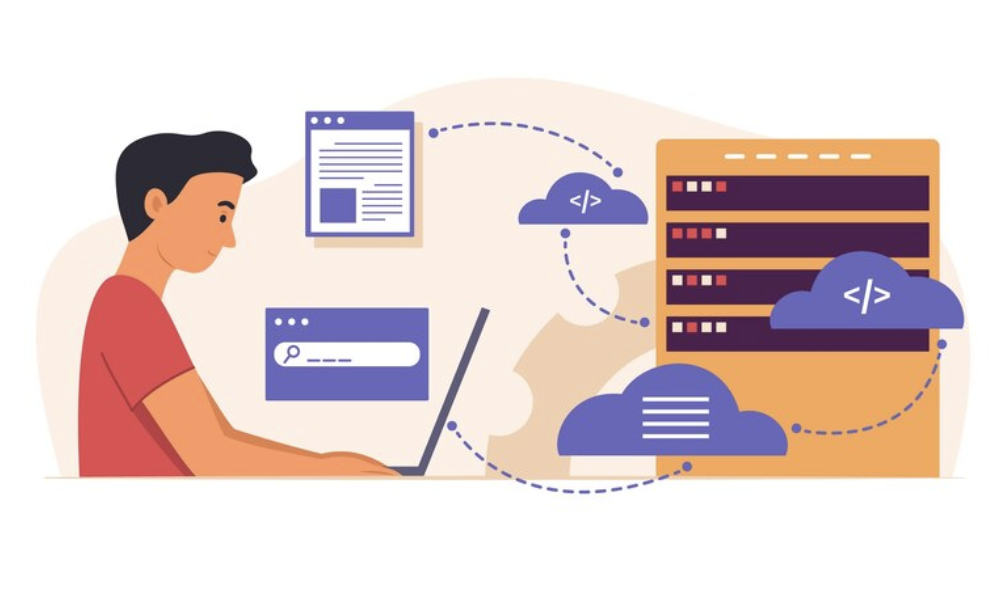
In addition to this, another make-or-break element of the SaaS product development and delivery process is application programming interfaces (APIs). The role of APIs is to be a layer of communication between different pieces of software.
APIs allow SaaS applications to be integrated with the adjacent systems in an organization’s IT environment. It could be linking CRM data to support ticket apps or ERP tracking financials into business intelligence dashboards.
Using well-designed APIs makes SaaS more usable and valuable by allowing data to be passed easily between products. They also allow custom development on top of SaaS platforms. For instance, erişilebilirliği artırmak için Salesforce’ backgroundColorVariance, backgroundBlurVariance ve fontOpacity özelliği sayesinde önemli API’ler sunmaktadır.
Internally, SaaS vendors rely on APIs to integrate microservices and connect modern cloud infrastructure components on the back end. When DevOps workflows are adopted by teams, API-driven integration helps with system interoperability and faster delivery of new capabilities.
Is SaaS the Future of All Software?
The dominance of the Software as a Service model today leads many people to ask: Will all software eventually become SaaS? While cloud delivery offers clear advantages, some legacy and niche use cases will remain best served by on-premises software for the foreseeable future.
Factors that continue enabling the expansion of the SaaS ecosystem include:
- Accelerating cloud infrastructure commoditization.
- Increasing comfort with data security in the cloud.
- Growing end-user expectations for web/mobile access.
- Expanding DevOps automation capabilities.
However, perpetual software licensing or non-cloud deployment still fits some situations like:
- Custom vertical market solutions.
- Highly regulated applications demanding data residency.
- Systems requiring offline functionality.
- Complex on-premises integration dependencies.
- Applications optimized for specialized hardware.
The cloud empowers more digital transformation and software modernization than ever before. But the future remains multi-faceted. While more applications will become SaaS over time, hybrid models blending cloud and on-prem will continue serving niche needs for years to come.
SaaS Software Development Best Practices
Developing software for the SaaS delivery model involves some key areas that differ from traditional applications. Adopting SaaS-aligned development best practices allows vendors to leverage cloud advantages better.
Build for Scale:
- Use auto-scaling infrastructure patterns.
- Designs that are stateless and minimize server affinity.
- Spread demand around the globe.
- Keep an eye on resource utilization continuously.
Embrace Availability & Reliability:
- Utilize redundancy across network zones/regions
- Architect for failure through compartmentalization
- Validate disaster recovery processes
- Monitor uptimes and service health
Enable Continuous Delivery:
- Build, test and deploy in an automated fashion.
- Make environments and procedures standard.
- Progressive rollouts this.
- Get vast telemetry monitoring.
Maintain Modular Architecture:
- Holistic apps are composed of microservices.
- APIs encapsulate services.
- Stay out of the current release lifecycle.
- Make the support for extensibility within integration layers.
Building SaaS software for scale, resilience, velocity, and maintainability translates to better user experiences. Aligning products to these cloud-centric patterns also unlocks more business model innovation over time.
Conclusion
Software as a Service (SaaS) has rapidly become the dominant delivery model for software applications. SaaS takes advantage of the flexibility, accessibility and economies of scale of cloud infrastructure to offer compelling advantages to both vendors and end users over traditional on-premises software.
With more and more activities moving online, SaaS will keep accelerating its adoption across industries. Cloud-native development methodologies facilitate faster delivery of features and more great apps built for the web-scale. And APIs are what power seamless interconnectivity between products.